NarrativeCraft 3
Hello, After a lot of thinking, I'm planning to move from 2.4 to 3.0 for NarrativeCraft.
The main goal is to rethink the UI and UX. We're moving from a shaky, multi-step creation process to a true studio: everything is handled on a single screen, with an intuitive and simple workflow and a built-in text editor.
Studio
The current UI, based on classic Minecraft screens, will be replaced by ImGui widgets. This has several advantages:
- No API issues between Minecraft versions
- Extensible
- Aesthetically pleasing
- Reliable API
Here is what it could look like in game:
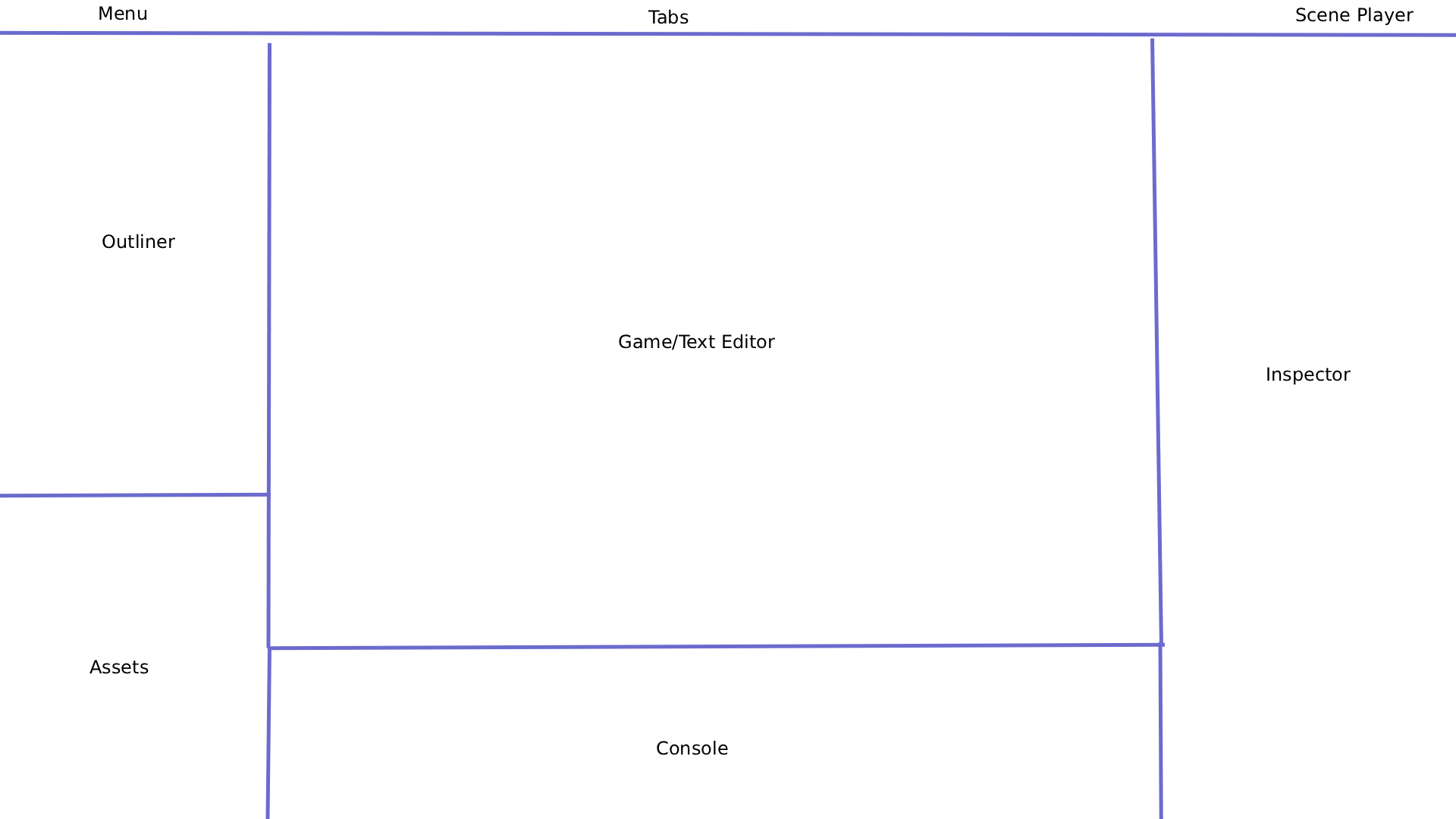
This is a mockup of what the final result could look like, heavily inspired by the Godot game engine.
Everything will be handled in a single window: no more pointless back-and-forth. The mod is becoming a true, serious game engine, while keeping a "work out of the box" spirit, where the main elements are simplified so beginners can easily prototype and create a narrative game from start to finish.
Outliner
The outliner displays nodes as a parent-child tree. Each node can be linked to an ink script.
Each node has an "eye" checkbox to set its visibility. If you hide a parent, all of its children are hidden too.
Assets
All of the project's assets are gathered here: ink files, images, and sounds. No more need for a resource pack to add images or sounds: everything is stored in one place for better organization (a resource pack remains possible for a more unique atmosphere).
Console
It is used to log useful information for debugging, as well as to retrieve or modify information (for example an ink variable, a choice, etc.).
Inspector
It lists all the parameters related to the selected node so you can adjust them.
Menu
It lets you save, export, access settings, etc.
Tabs
They display the active tab (Scene, TextEditor).
Scene Player
It groups all the buttons for playing, pausing, or stopping a scene.
Organization
Currently, organization is strict: a chapter is made up of scenes. This means you have to follow a specific way of writing a scene, with everything in a single file and no real way to split it up properly without getting lost.
NarrativeCraft 3 offers a very simple alternative: you are your own organizer.
You manage your folders, files, scenes, and data. If you want to write an ink script, simply link it to a node, then organize it in the Assets section.
This offers more freedom and, above all, better organization when writing a scene, since everything can be split up.
Tags
The old tags are gone: say hello to a more minimalist system, designed to be as accessible as possible.
For example, playing an animation is no longer written animation play name, but simply @AnimationName.
Practical Example
You want to play an animation when the player clicks on an object:
- Add an "Animation" node to your scene and rename it however you like.
- Open the ink file that is executed on click.
- Drag and drop the node into the editor.
This automatically writes # @AnimationName, and the animation will play when that line is reached.
Actions and Parameters
- Each node type has a default action (an animation plays, a sound starts, etc.), but you can specify a different one:
# @AnimationName stop. - You can still adjust parameters from the inspector, or directly in the tag:
# @AnimationName speed:1.3.
Note: parameters set in a tag only apply at runtime, while the scene is playing. They do not change the values in the editor.
Nodes
NarrativeCraft 3 offers a "node" system, like classic game engines: an outliner with parent and child elements. Each node has its own data, editable in the inspector.
This system replaces the "only one editor at a time" constraint and lets you display everything you need: zone, point, camera, NPC, etc. If you don't want an element to be displayed, simply hide the node using its eye icon.
Session
The notion of a session is being rethought to be more flexible, like in game engines: one scene = one session. You only edit one scene at a time, and you can switch scenes whenever you want.
- The animations you record are linked to the scene you are editing. The same goes for cinematics.
- When you switch scenes, all visible elements are displayed and you are teleported to the location where you were while editing that scene.
- If the distance between the old and new positions is significant, a loading screen is displayed to give chunks time to load before everything appears.
Scene Playback
To test a scene, use the buttons at the top right of the studio: they start the scene from the beginning and let you stop it at any time.
During playback, the studio is hidden and the game takes up the full size of the window.
Cinematics
Cinematic creation will be reworked to offer more editing through the inspector, for each layer, instead of going through a tag (for example, to display text).
When you edit a cinematic, all the elements of the studio scene are hidden, so that only those related to the cinematic are shown.
NarrativeCraft's cinematic editing remains deliberately simple when it comes to player movement (vanilla mode). An official BBS 2 addon for NarrativeCraft will add more freedom for designing complex animations, for those who want to go further.
Data
Data storage will be reworked. The way the world currently stores data (camera angles, dialogue data, etc.) is rather shaky. As a result, a 2.4 → 3.0 migration will be impossible.
API
The mod's developer API will be reworked, as it is currently too limited to create a large addon adding support for another Minecraft mod.
Export
For a better sharing experience, the mod will offer an option to export the world with all assets and the compiled story, without the ink files.
This will create a clone of your world in production mode, in which you can only play, not edit. It will not contain your ink files, only the compiled JSON of your story, along with the assets needed for the story to run.
Multiplayer
NarrativeCraft 3 will not be available in multiplayer or on dedicated servers.
The mod is first and foremost a way to turn Minecraft into a game engine for creating solo narrative games. Multiplayer has never been my priority, and it never will be.
Moreover, adapting NarrativeCraft 3 to multiplayer, particularly at the studio level, would require much more technical work, for support that doesn't match my vision of the mod.
However, developers may, if they wish, offer a multiplayer version for servers, with for example:
- co-op;
- or a story played by a single player.
Since the mod is first and foremost open source under the MIT license, that freedom is entirely left to them.